 pocket-ui
Home › Features
Everything it does
The big moments first, the little things below.
pocket-ui treats your games like a collection you can touch. Here's what that feels like, each with a short video.

Every game in its real box
Cardboard boxes, jewel cases, DVD cases and cartridges, made from photos of the real things and standing at their real sizes. Press X and the case opens: the disc or the cartridge is right there. Add stickers for the games you finished, and watch a plant grow on your shelf the more you play.
The back of a Pokémon Crystal box shows the badges and the team from the save, then the same team in the game, in motion.
 Watch it · 0:19
This video is on its way.
The case knows how far you are
Turn the box over and the first line tells you where you are, read from your own save: your badges and your Pokémon team, stars in Super Mario 64, pendants and hearts in Zelda, items in Metroid, gold cups in Mario Kart 64. The same line waits beside Continue. No account, no Wi-Fi, and a save it can't read shows no line, never a wrong one. Which games?

In it goes, TV on
Pick a game and it goes in like the real thing: the cartridge slides into the Super Nintendo, the GameCube's lid pops open for the disc, the PlayStation's lid shuts over it. Then the old TV flickers on and you're playing. Quit, and the game comes back out, into its case and onto the shelf. In a hurry? Any button skips it.
A half-open case, and A goes straight back into the game, in motion.
 Watch it · 0:23
This video is on its way.
Continue
Your last five games stand a little open on the shelf: an open case means a moment is waiting. Press A and you're back in it. Can't decide? Just Play picks a game for you.

One pause menu for every console
HOME opens the same menu in every game, from Game Boy to GameCube: eight save slots with pictures, Earlier to jump back a few minutes, and quick settings. Put your game in a wooden TV, a handheld shell or a CRT if you like.
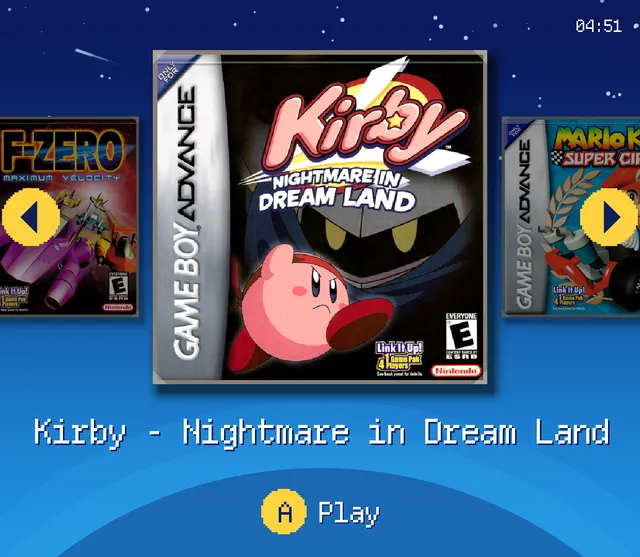
The same shelf in Retro with the Pea colours.

Retro, in one switch
Settings → Look → Style → Retro: pixel letters, chunky pixel frames, little icons and soft blips in every menu. Cocoa for warm evenings, Pea like an old green screen (above). Your boxes stay exactly as they are.

Easy to fill
A first start in four steps: language, Wi-Fi, your games, your look. Send games from your phone by scanning a code, no app and no computer. Game check tells you which games are ready and what the others need, and it never deletes anything.

Every game has a story
Turn the box over for pictures and what the game is about. See who made it, its series and the other parts you own, even without Wi-Fi. Rediscover brings back what you played a year ago today.

Make it yours
Four looks for your shelf, each in dark or light: Shelf, Split, Cabinet and Easy, one big game at a time for anyone you hand it to. Kids Mode keeps a simple shelf with the games you pick, behind your PIN. Colours, letters and button symbols are yours to choose.
Which games the case knows
pocket-ui reads these games' own saves (the in-game save, not a save state). Other versions, hacks and damaged saves show no line at all, never a wrong one.
| Group | Games | Versions |
|---|---|---|
| Pokémon, Game Boy to GBA | Pokémon Red, Blue, Yellow, Gold, Silver, Crystal, Ruby, Sapphire, Emerald, FireRed, LeafGreen | USA and Europe in English |
| Metroid and Zelda | Super Metroid, Metroid: Zero Mission, Zelda: A Link to the Past, Link's Awakening DX, Oracle of Ages, Oracle of Seasons, The Minish Cap, Ocarina of Time | USA |
| Mario, Nintendo 64 and Donkey Kong | Super Mario World, Super Mario All-Stars + Super Mario World, Super Mario 64, Mario Kart 64, Star Fox 64, Paper Mario, Zelda: Majora's Mask, Donkey Kong Country 1–3 | USA |
| Racing | Diddy Kong Racing | USA, Europe |
| Pokémon on the DS | Pokémon Diamond, Pearl, Platinum, HeartGold, SoulSilver, Black, White, Black 2, White 2 | USA and Europe in English |
| Golden Sun | Golden Sun, Golden Sun: The Lost Age | USA and Europe in English |
| More classics | Final Fantasy III (VI), EarthBound, Chrono Trigger, Fire Emblem, The Sacred Stones, Kirby & the Amazing Mirror | USA |
| Role-playing games | Super Mario RPG, Lufia II, Pokémon Mystery Dungeon: Red Rescue Team, Final Fantasy VI Advance, Tactics Ogre: The Knight of Lodis, Breath of Fire II, Mario & Luigi: Superstar Saga | USA |
Pick your look
The same cases and the same Continue, four ways. Switch any time in Settings → Look → Layout.
The Shelf look.
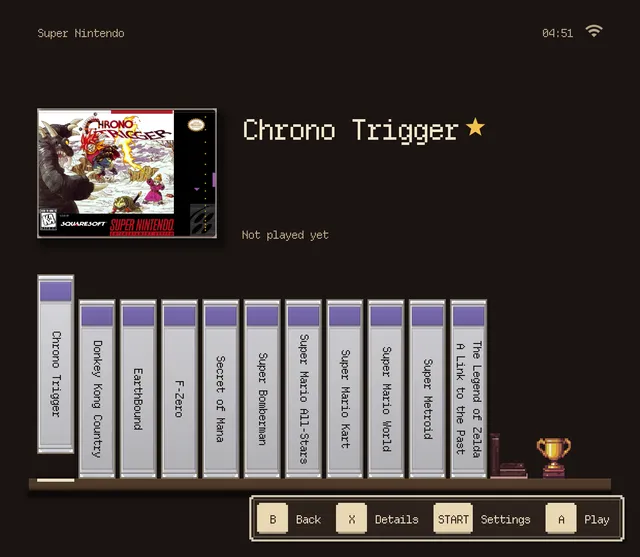
Shelf. Your cases side by side, the one you pick shows its cover.
The Split look.
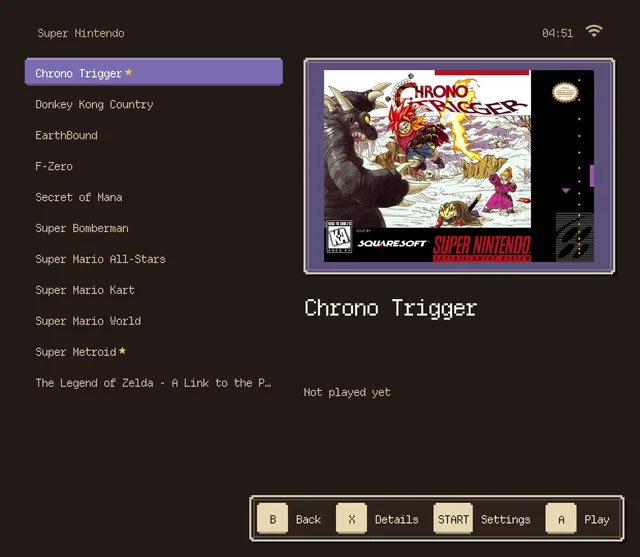
Split. A tidy list on the left, the big box art on the right.
The Cabinet look.
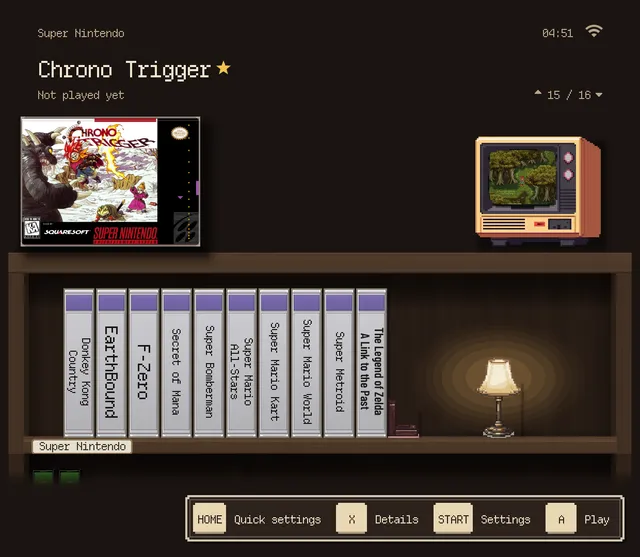
Cabinet. A wooden cabinet with a lamp, and a little TV showing the game you're on.
The Easy look.
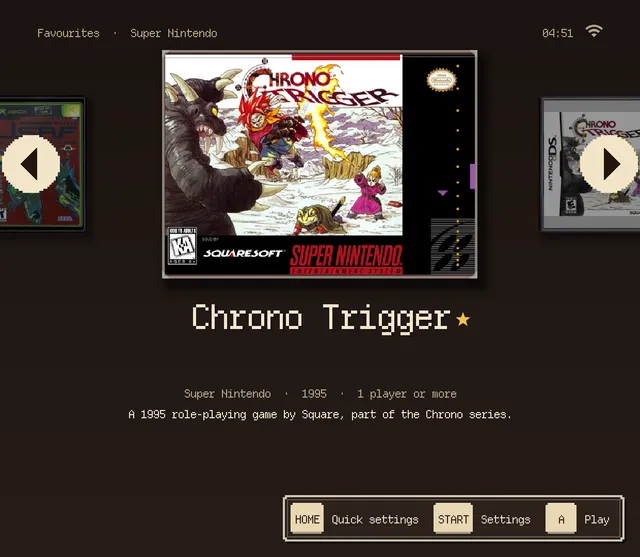
Easy. One big game at a time, big letters, simple menus. Hand it to anyone.
Kids Mode's shelf.
Kids Mode
A shelf of its own for a child, with only the games you pick. Big, bright and simple: Left, Right, A. Set how long and how loud, and everything else stays behind your PIN. Settings → System → Kids mode, or right in the first start.
Also in the box
- Updates over Wi-Fi with one press. Games and saves stay.
- New games come shrink-wrapped, and the film tears off the first time you play.
- Consoles in their real colours: a Pink or Milky Blue GBA, an Ice Blue N64, a Jet Black GameCube.
- Where was I? tells you where you left off, even weeks later.
- Bluetooth headphones and controllers, paired right on the handheld.
- Every controller keeps its own button layout, and Test buttons lights up each press.
- Battery in plain words: "about 4 h 50 min left".
- Big text: larger words in one switch.
- All your saves backed up in one go.
- CRT, scanline and LCD looks with a live preview.
- RetroAchievements.
- PortMaster ports in their own boxes on the shelf.
- PlayStation 2, GameCube and Wii on the stronger handhelds. What plays on mine?
- On the TrimUI Brick: a card of its own, with F1 and F2 for quick save and load. The Brick page
- Menus in English, German, Spanish, French, Italian and Brazilian Portuguese.
Every detail, page by page: the manual.